

COLWRIT R4B
Library Research Notebook
Oct 14, 2022. By Sierra Zhang.

Here’s a synopsis of what this notebook covers and gives us experience with:
-
How to reflect on your research passions / what interests you? / you care about what?
-
How to generate keywords and why they are crucial
-
Keyword tips & tricks / Know Boolean operators!
-
How to narrow your research topic
-
How to find background information
-
How to navigate UC Library Search
-
How to find relevant books
-
How to do a virtual shelf search or “virtual browse”
-
How to find articles
-
What’s a peer reviewed article?
-
How to explore database searching
-
How to locate several relevant academic journal articles
-
How to get help from a librarian (several ways)
-
How to find a research guide for your topic
SECTION 1
Read the entire Library Research Notebook, follow the instructions, and respond at ***prompts. You are free to pursue here your self-chosen research topic for either Project 2 (script & presentation w/ slide-deck) or Project 3 (final multimodal expository research essay).
***I am researching. . . .
I am researching the stories behind sensations on the internet.
***Because I want to find out why / what / how. . . .
Because I want to find out how sensations (either a YouTube video, an ad, a meme, a joke, and so on) become popular, either because of algorithms, the characteristic of the content, or the charisma of the content creator.
***List any important people, places, time periods, concepts, movements, etc. related to your topic. What key words are beginning to emerge?
1997, Think Different, ads of Apple, TBWA\Chiat\Day, Steve Jobs, Lee Clow
2006, Will It Blend? ads, Blendtec, Tom Dickson (CEO).
2012, Gangnam Style, YouTube video (music video), PSY.
2010, Doge, meme. 2009, Never Gonna Give You Up, Rickroll, Rick Astley.
“86,” “69,” “42,” “420,” “101.”
Keywords: sensation, Internet phenomena, ad campaigns, viral marketing, viral videos, catchphrases, and so on…
***Explain how doing this research will inspire you and be relevant to your time at Cal and to your quality of life now and in the future, how it will contribute to the Common Good, and/or how your research in R4B can benefit you in your future career. In other words, are you passionate about this topic? Is it relevant to you? If so, why? If not, what meaningful, relevant-to-you research topic might you pick that you can invest yourself in wholeheartedly and benefit from both now and later?
This topic is related to me in different ways
-
I have always tried to create very high-quality videos, but they were never a hit. But at the same time, some of my lower-quality videos gathered a lot more views. For example, my medium-length movie that a 15-person team spent six months on got about 1500 views in a year, but a simple supercut I made in half an hour reached 10000 views in two days. At the same time, some, in my opinion, lower-quality videos (aesthetically, conceptually, and technically) other creators created have gotten hundreds of thousands of views. I noticed a mismatch between quality and popularity, but why?
-
I am very active on the Internet and am involved in two different online environments (the U.S. and Chinese). In both environments, the Internet phenomena have a rather powerful impact on our daily lives: people are talking about them and being influenced by them. Also, these phenomena generate “togetherness” such that even if two people do not know each other, they would feel “connected” when they bring up an Internet sensation they both know. I wonder how these phenomena could bring so many people from different backgrounds together.
-
I wish to build a company that brings people delightful products with their own “spirits” in them, just like the strong corporate values underlying the Think Different ad campaign. When the business is ramping up, popularity (in a good way) is needed. I wish to apply what I learned from this research then.
SECTION 2
GENERATE KEYWORDS
We've just done some background research that helped us generate keywords. It's good to have a long list of search terms that you can use when looking for books and articles about your topic. This is because everyone thinks differently, and resource discovery tools think differently than people - you may use the word "red" to describe Elmo, but your professor may call Elmo "crimson," and the database may call Elmo "scarlet." To mediate the effects of this, it is useful to think about synonyms and alternate phrases ahead of time.
Keyword 1 – 2 – 3
***Condense your research question or thesis statement into a brief statement of 6-8 words:
How (Why) Internet sensations got popular?
***Identify some core concepts in your statement and any related concepts that come to mind (topics, issues, ideas, people, places, time periods, films, tv shows, news, media, things, objects, etc.): Internet, sensations, phenomena, viral, hit, video, marketing, media, catchphrases, ads, Will it Blend…
Keyword Tips and Tricks
Search like a pro using these smooth operators
Research Hacks Using Simple Words and Punctuation as "Commands"

SECTION 3
FINDING BACKGROUND INFORMATION
Before taking a deep dive into scholarly research, you should first find out some background information about your topic. That's a best practice, a necessity. Here's how:
-
Consult encyclopedias, introductory guides, and other reference tools that can provide you with a high level overview of your topic.
-
Look for key information (names, dates, movements, important works, etc.), themes, and keywords that will help you search for books and articles.
-
Look at encyclopedia entries that will often include bibliographies to give you a head start on important scholarship.
Start Here: https://search-credoreference-com.libproxy.berkeley.edu/
Search your broad topic, concept, time period, movement, author, etc. Scan a relevant, substantive entry, and jot down important keywords, facts, dates, and scholarly book references.
Keeping good notes, either in a research notebook, whether analog: such as spiral bound paper or digital, such as PowerNotes (https://powernotes.com/) or Zotero or others (https://www.relevance.com/six-tools-to-run-and-organize-your-content-research/) is essential. Many options have free basic services that can help you beast R4B.
Using Credo Reference, insert your proposed research topic, and read a few of the amazing sources that come up. Pick one that is especially useful. (Also note that you can elect to "Save" the ones you find useful and want to come back to.)

***What is one thing you learned about your topic from this entry you selected?
“Viral Aesthetics” from The Johns Hopkins Guide to Digital Media.
To learn about the “virality” of online content, we need to look into the social background (“milieu”) in which the contents were able to display their powers (Ryan et al.).
***What terms from the entry could you use as keywords when you search other databases?
virality, viral aesthetics, mass media, memetic, milieu, network affordances, viral patterns, genetic algorithms, topology, network diagrams, networks, information visualization…
***Look at the bibliography in the source you just chose. Write down the title of one book that might further propel your project. *Seriously. Write title and author down in your notebook - you're going to want to remember this. If you don't see a bibliography for your entry, try clicking on another source.
Barabasi, Albert-Laszlo. Linked: Linked: How Everything Is Connected to Everything Else and What It Means for Business, Science, and Everyday Life.
Sampson, Tony D. “The Accidental Topology of Digital Culture: How the Network Becomes Viral.”
SECTION 4
LOOK AT YOU GO!
Remember that excellent research happens because you care about your topic, are excited to find out more, work on it weekly several hours, are unafraid to hit a dead end, back up, and try another path, and keep going.
***Stop to look at this cool view of UC Library Search, and in 1 sentence explain what you can access through UC Library Search (see https://guides.lib.berkeley.edu/c.php?g=383822&p=2601778) for help:
Through UC Library Search, we can access most books, articles, archival collections, and media from UC Berkeley library, UC libraries, and WorldCat (UC Berkeley Library).
Extra note:
Multi-disciplinary databases link:
Academic Search Complete : general interest journals
JSTOR
Project MUSE : digitized journals and books (humanities)
Multi-modal databases link:
AP Newsroom : historical associated press photos
ARTstor : High-res art, architecture, and design images
Calisphere : diverse history and culture of California
Digital Public Library of America (DPLA) : resources of America's libraries, archives, and museums collectively
Europeana : digital resouces from from European institutions
The World through the Lens : early history of photography across the globe

***What resources does UC Berkeley Library offer you here? – explain in 1 sentence. See https://guides.lib.berkeley.edu/c.php?g=383822&p=2666393
On this website, UC Berkeley Library offers citation style manuals (Chicago and MLA), writing handbooks (guides to writing about art), and research guides (general, library research, and art history research) (UC Berkeley Library).
***What is a scholarly (also called “refereed”) journal article? – explain in 1 sentence. See https://guides.lib.berkeley.edu/c.php?g=83917&p=3747680
A scholarly article is one peer-evaluated journal article that experts in the field wrote to communicate research findings or for educational purposes, is organized in formal formats with an in-depth focus on specific topics, and include academic jargons and formal citations. They appeal to specialists in the area (UC Berkeley Library).
Pause–I mean Paws–a Moment
Remember that you matter.
Just because you exist.
I’m grateful for you!
You can do this.
Honor your voice.
Your friend,
Carmen (& Tao)

SECTION 5
FIND A BOOK
Let's take the keywords we've generated and put them to use! UC Library Search launched in July 2021, and it replaces Oskicat and Melvyl as the Berkeley library catalog for books. UC Library Search is the University of California’s new unified discovery and borrowing system that streamlines your search for UC Library collections.
UC LIBRARY SEARCH INCLUDES:
-
Scholarly and peer-reviewed journals and articles
-
Scholarly Books and eBooks | Other Books and eBooks
-
Course Reserves
-
Special formats (media, maps, newspapers, dissertations, etc.)
-
Government documents and datasets
-
Primary resources, archives, and special collections
UC Library Search does not include everything UC Berkeley offers (ex: UC Berkeley Law Library collections at https://lawcat.berkeley.edu/). For a full list of what is not included, see our FAQ here: https://ucberkeley.libanswers.com/faq/349506. More information can be found in our UC Library Search User Guide here: https://guides.lib.berkeley.edu/uclibrarysearch/.
Why find a book?
-
Books are good places to start because they provide breadth and depth on your topic. Remember that books tend to have a two-year delay on publication, which means their contain information that is a bit older once published.
-
By contrast, journal articles have “fresher data,” but may often be too narrow at the early stages of the research process.
-
You can use one relevant book to find other relevant books.
-
A good book's footnotes and Bibliography (Works Cited) are like source treasure chests!
Start here: https://search.library.berkeley.edu/discovery/search?vid=01UCS_BER:UCB
A Book Is as Cool as a Light Saber. Word.

***Briefly explain how a (scholarly or other) book differs from a (scholarly/refereed or other) journal article (see above).
Scholarly books are more comprehensive and go more in-depth into the research topic, while journal articles present narrower perspectives. However, books tend to present older information due to their two-year lead time, and scholarly journals have newer facts and data.
***Briefly explain how a scholarly work (book or journal/refereed article) differs from a popular one; see again: https://guides.lib.berkeley.edu/c.php?g=83917&p=3747680
A scholarly article is one peer-evaluated journal article written by experts in the field to communicate research findings or for educational purposes. In contrast, a popular article is written by generalists and edited by in-house editors to provide entertainment or news. Scholarly journals are organized in formal formats with an in-depth focus on specific topics and include academic jargons and formal citations. Nevertheless, popular articles vary in formats, provide a broader view on focused topics, and may or may not include in-text citations to credit their sources. They are likely to have specific terms defined for ease of reading. Scholarly journals appeal to specialists in the area, but popular sources appeal to general readers with no special background required (UC Berkeley Library).
***Find a Book. Remember how I asked you to find a book in the encyclopedia bibliography before? Well we're coming back to that now! Try to find that book in UC Library Search! If you can't find it, try to find another book on your topic using the search terms you generated. Write down the call number of the book you found!
Q295 .B26 2003
Find Books Nearby on the Shelf
The call number of a book is like an address. It tells you the location of the book. Books at the library are arranged on the shelf by topic. This means you can find several books about your topic near each other. Even when you're online, you can find out what's nearby on the shelf by clicking on a book's call number. From above, let's pick call # PN1995.9.S695 S76 2005 for Star Wars and Philosophy by Decker and Eberl.
Click on the call number and locate two more books on your topic. Do a "Virtual Browse" and/or an In-Person One, if safe and if permitted on campus.
Here you are doing a "Virtual Browse," a function located at the bottom of the webpage after you click on your chosen call number. Write the titles, locations, and call numbers below of the 2 other books you found from Virtual Browsing. In order to do a "Virtual Browse," you must have a call number to click on (an actual book on an actual shelf in a Berkeley Library). When you click on the call number, then at the very bottom of the webpage, you'll see the "Virtual Browse" findings. You must scroll all the way down. Example of a call number: PE1617.O94 W55.
Note: If possible, try this technique in person at Moffitt or another library on campus. Go to that stack of your chosen call number, and look around that book on those shelves nearby. Also remember sometimes books are misshelved by students, faculty (!), and others there, so look in places all around, and be adventurous. Serendipity is also a part of well-organized, conscientious research efforts.
***Below you see the section "Virtual Browse" and the selections I found from putting in call # PN1995.9.S695 S76 2005 for Star Wars and Philosophy by Decker and Eberl. Do your own Virtual Browse using your research topic / selected book, and then after virtual browsing, write below the titles, locations, and call #s of the 2 other books you found from Virtual Browsing:
Nahon, Karine and Jeff Hemsley. Going Viral. 2013.
Main (Gardner) Stacks; HM851 .N34 2013.
Sampson, Tony D. Virality: contagion theory in the age of networks. 2012.
Main (Gardner) Stacks; BF357 .S26 2012.

Way to go! We're in this together!

SECTION 6
FIND ARTICLES
-
Peer-review is a process by which experts in a field fact-check an article before it is published
-
This process is time consuming and expensive, which is why it's difficult for scholars to get published
-
Peer-reviewed articles often address more focused topics.
-
Often to choose a peer-reviewed article, you must click "Peer Reviewed" under "Limit To" on the "Refine Results" (see below).
***What are peer-reviewed articles and why are citations important? Sum up in 1 sentence after watching video (See Video by Marisa Méndez-Brady)
Peer-reviewed articles are articles submitted to a scholarly journal and are verified and fact-checked by experts in the field. Citations are important in three ways: they express appreciation for others’ works that came before this work was built upon, make it easy for peer-reviewers to follow up on and verify the author’s ideas and claims, and record all of the sources that gave the author ideas so the authors can say they have added something new to the field through their articles (Mendez-Brady).
Find Peer-Reviewed Journal Articles
Berkeley subscribes to many databases that contain peer-reviewed articles. These databases are subject specific, so the best way to choose a useful database for your research is to select the subject that is most related to your research topic from the dropdown menu "All Subjects," and choose a database that is recommended by a librarian in your subject area.
Start here: https://guides.lib.berkeley.edu/az.php
Some good interdisciplinary database options are:
Click on "All Subjects" to choose databases that help your research


***What database did you choose? Under "Film Studies," I chose "Film and Television Literature Index with Full Text." Give yours here:
Under “Media Studies,” I chose “Communication Abstracts.”
***Search the database using the keywords you generated earlier, and find a relevant article. Copy paste a citation for an article on your topic:
Ehlers, L., and S. van Schalkwyk. “Product Videos ‘Gone Viral’: Exploring the Role of Content, Positive Affect and Social Motivations.” Communicare, vol. 40, no. 2, Dec. 2021, pp. 43–62. EBSCOhost, https://search.ebscohost.com/login.aspx?direct=true&db=cax&AN=155639245&site=ehost-live.
***Download the article if full text is available. I chose "Return of the Jedi: Epic Graffiti" by Todd H. Sammons, as my peer-reviewed article.
I chose “Product Videos ‘Gone Viral’: Exploring the Role of Content, Positive Affect and Social Motivations” as my peer-reviewed article.
***Find an Article from the Bibliography. Open the article you just found. (If it isn't available through Berkeley, browse your results again for a full text article on your topic.) Scroll through your article until you reach the bibliography. Browse the bibliography for another article on your topic. Write down the title and author below. Also remember to search footnotes for new sources! Give yours here!
Berger, J. and K.L. Milkman. What makes online content viral? Journal of Marketing Research.
Nelson-Field, Karen, Riebe, Erica and Kellie Newstead. The emotions that drive viral video. Australasian Marketing Journal.

***New Keywords? Scan the titles, abstracts, and subjects of your search results. Have you come across any new keywords as you've searched? Write them down here:
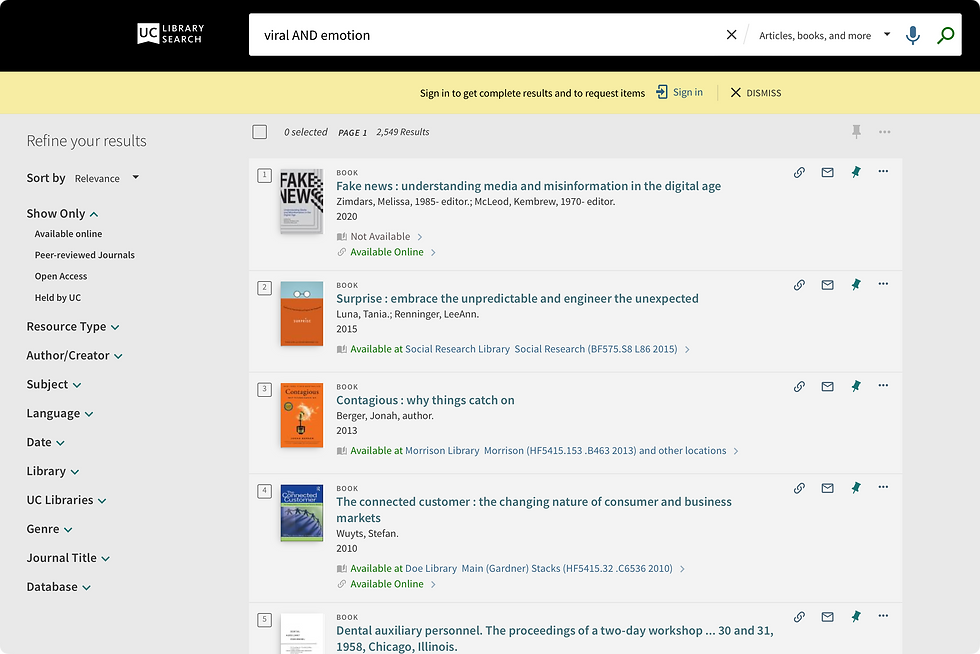
Positive effect, social motivations, forwarding intention (AND viral marketing), mediating effect(?), social transmission, emotion AND virality, high arousal emotions.
SECTION 7
WAY TO GO & ASK AN LIBRARIAN FOR HELP!
You now have 3 books and at least 2 articles to add to your bibliography! Woot!
I know you're excited, but stop here for a minute...
Pro tip: If Berkeley does not have access to the article that you want, you can request it from ILL and it will be delivered to your email in a few days! ILL? That's InterLibrary Loan, and yes, in the parlance for today, ILL is "sick"! You need to plan ahead to use it, as sometimes it can take a few days or longer to get the ILL you request, but it's an awesome way to expand your research parameters!
Request It
-
This link connects you to borrow from other libraries. If our library is able to request or purchase the article, they'll send a scan to your inbox in a few days! https://www.lib.berkeley.edu/using-the-libraries/interlibrary-loan-borrowing
Get Help
-
Always a good option if you're feeling confused. Simply go here for many ways to Ask a Librarian: https://search.library.berkeley.edu/discovery/search?vid=01UCS_BER:UCB
Librarians love it when you ask them for help. You can make a research appointment or have an online chat. Do it! Just click on one of the links below, found here: https://search.library.berkeley.edu/discovery/search?vid=01UCS_BER:UCB


SECTION 8
EXPLORE MORE
Research Guides & More!
Find the Research Guide for Your Topic
The Library has specialized research guides for every discipline. If you are doing an interdisciplinary topic, there may be several guides relevant to you.
***Browse all research guides at https://guides.lib.berkeley.edu/ Click on a subject related to your topic and select a guide link that you might use. Give it here.
Digital Humanities > Information Studies (Guide)
***Find a Database or Digital Collection Useful for You. Look through the Research Guide you choose above. Write down the name of a database or digital collection that might be useful to you as you continue to research. Give that here:
Under “Digital Humanities > Information Studies” I selected “Sage Research Methods ” which includes 150+ sample datasets, a project planning tool, and Sage Internet Research Methods (UC Berkeley Library). https://methods.sagepub.com
What other sources might be helpful to answer your research question?
Don't be afraid to explore! A research project, remember, is the tip of the iceberg. The "iceberg" is all the research you did, and it all counts and you learn from it; however, only the "tip" of the iceberg makes it into the project. That's true for everyone, at all levels of research experience.
Getting Research Help. Here are additional ways to get help:
-
Learn more about UC Library Search: https://news.lib.berkeley.edu/uc-library-search
-
Stay up to date with Library Services and Resources During COVID-19: https://www.lib.berkeley.edu/help/research-help/remote-resources
-
24/7 Chat/IM: tinyurl.com/3km75szf
-
Research help appointments (via Zoom): https://berkeley.libcal.com/appointments
-
Email subject librarians to get help in a specific subject: https://www.lib.berkeley.edu/help/subject-specialists
***Write down ways that you have sought help already and/or ways that you will seek help, including the possibilities listed right above and asterisked:
Already: Library Research 101 workshop and UC Library Search
Future: “ILL,” 24/7 chat, ask Carmen and from her feedbacks, research help appointments, Ask a librarian.
***Write down 3 other sources that may help you. These could include newspapers, other databases, other books, other peer-reviewed articles, images, recordings such as at the Library of Congress, podcasts, original photos, etc. Give these here:
Database: Library and Information Science Abstracts (LISA)
Database (very useful!): Social Science Research Network
Video: Objectivity and Subjectivity in Social Research
***What's something you want the librarian to cover during your library workshop or what is a question you have for a librarian? Write it down.
Are all the books listed in the library search scholarly sources ready to be used in research? (For example, will fictional works also pop up in the search results?)
Feedback for Our Amazing Librarians
***I am a. . . . [first year, second, third, fourth year, other]
Second year
***What is one thing that worked well about this notebook?
I love the slow pace and logical flow of the notebook. It helps me gradually develop my research topic in an orderly manner and helped to achieve that “wow” moment when I found credible sources to use! The pace of this notebook also helped me to gain confidence in my research — from “it will be hard to find sources about this topic” when I just started browsing for sources, and few turned out, to “oh, now I know how to find those” after finishing the notebook.
***How long did this take you to complete?
Around 6 hours.
***What is one way this notebook could be improved?
Since this notebook will be beneficial throughout college (and later stages of academic life as well) so I think to improve, we can make this “notebook” look more like a personal research notebook. I think answering some prompts with complete sentences is excellent for practicing our academic integrity. However, it might be difficult if we want to refer to some of the important elements in our answers quickly. A personalized table of contents or “quick link” section with some consolidated resource links would be helpful for us to refer back to in later stages.
Sources: This Library Research Notebook is continuously adapted by Dr. Carmen Acevedo Butcher according to excellent student feedback (thank you past and present students), also from a google form by UC Berkeley Librarian Kristina Bush and from an adaptation of that work by UC Berkeley Librarian Kiyoko Shiosaki.